
Ace Permissions?
Ace Permissions?
Aces are the built-in permissions system provided by CFX. They allow for creating new nodes which have aces attached to them. This permission system consists of aces & principals. Essentially think of a tree with branches. We have our ace that we create and then each branch would be our principal which inherits the permissions of our ace
txAdmin should automatically set the server owner as the highest permission level
Server Config
Learn how to update your docs locally and deploy them to the public.Edit and preview
- At the bottom of your server.cfg file you will see a permissions section
Different types of identifiers
- FiveM ID
- Rockstar license (what rsgcore uses)
- Discord ID
 If they are currently connected to the server, you will get all available identifiers
After gathering the desired identifiers, go to your server.cfg and add the Players section as shown below
rsgcore.god and group.admin share the same permissions you can use either one.
Setting users permissions in the server
While you have permissions you can set users permissions either using commands or the admin menuSetting permissions using the command
Setting permissions using the command
-
While in the server type in the command
/addpermission [id] [addpermissions] -
It will look something like this
/addpermission 1 god
Allowing commands to specific permissions
In rsg-core/config.lua findRSGConfig.Server.Permissions = {'god', 'admin', 'mod'}
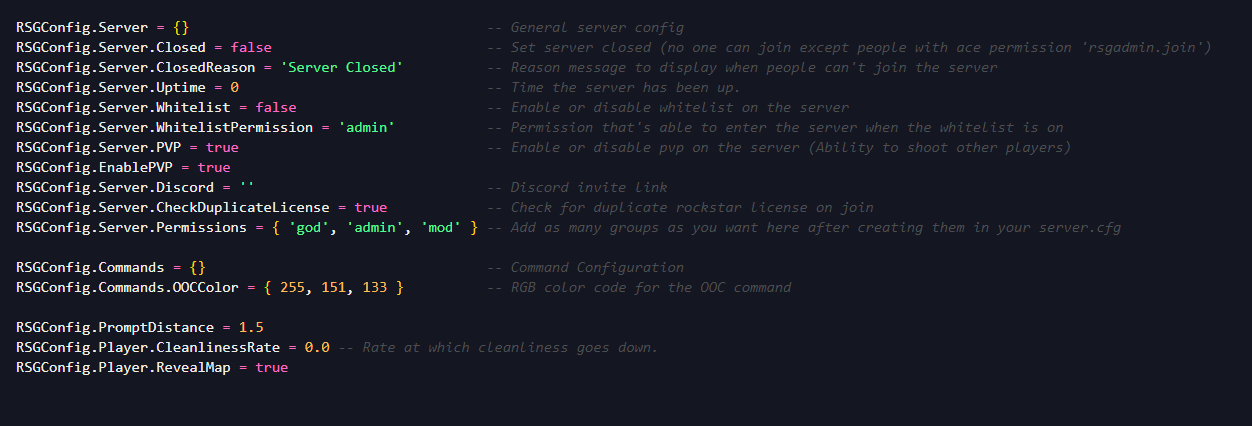
RSGConfig.Server.Permissions = {'god', 'admin', 'mod', 'law'}
Making a command for only leo can access would look like
add_principal identifier.license:xxxx rsgcore.law and now that command will be restricted to only those with that permission as well as remove the chat suggestion for anyone without this permission! Imagine if you used this when setting a players job or when a player clocked in/out to dynamically remove the permission. This also completely eliminates the need to ever check job permissions on a command like this because the command itself will already be restricted